

Grok Chat Completion API Application and Usage
xAI Grok is a very powerful AI dialogue system that can generate smooth and natural replies in just a few seconds by inputting prompts. Grok stands out in the industry with its unique humorous style and real-time web information retrieval capabilities. Today, Grok has emerged in several innovative fields, and its influence is rapidly expanding. Whether for daily conversations, creative writing, or technical analysis and code debugging, Grok can provide insightful intelligent assistance, bringing a new dimension of support to users' decision-making and creation.
This document mainly introduces the usage process of the Grok Chat Completion API, allowing us to easily utilize the official Grok dialogue features.
¶ Application Process
To use the Grok Chat Completion API, first go to the 辰汐ai Console to obtain your API Token for backup.

If you are not logged in or registered, you will be automatically redirected to the login page to invite you to register and log in. After completing this, you will be automatically returned to the current page.
One API Token can call all services on the platform without needing to apply separately for each service. The first application will grant a free quota for a trial experience; when the quota is insufficient, you can recharge the general balance in the console.
📘 Complete Documentation: Grok Chat Completion API →
¶ Basic Usage
Next, you can fill in the corresponding content on the interface, as shown in the figure:
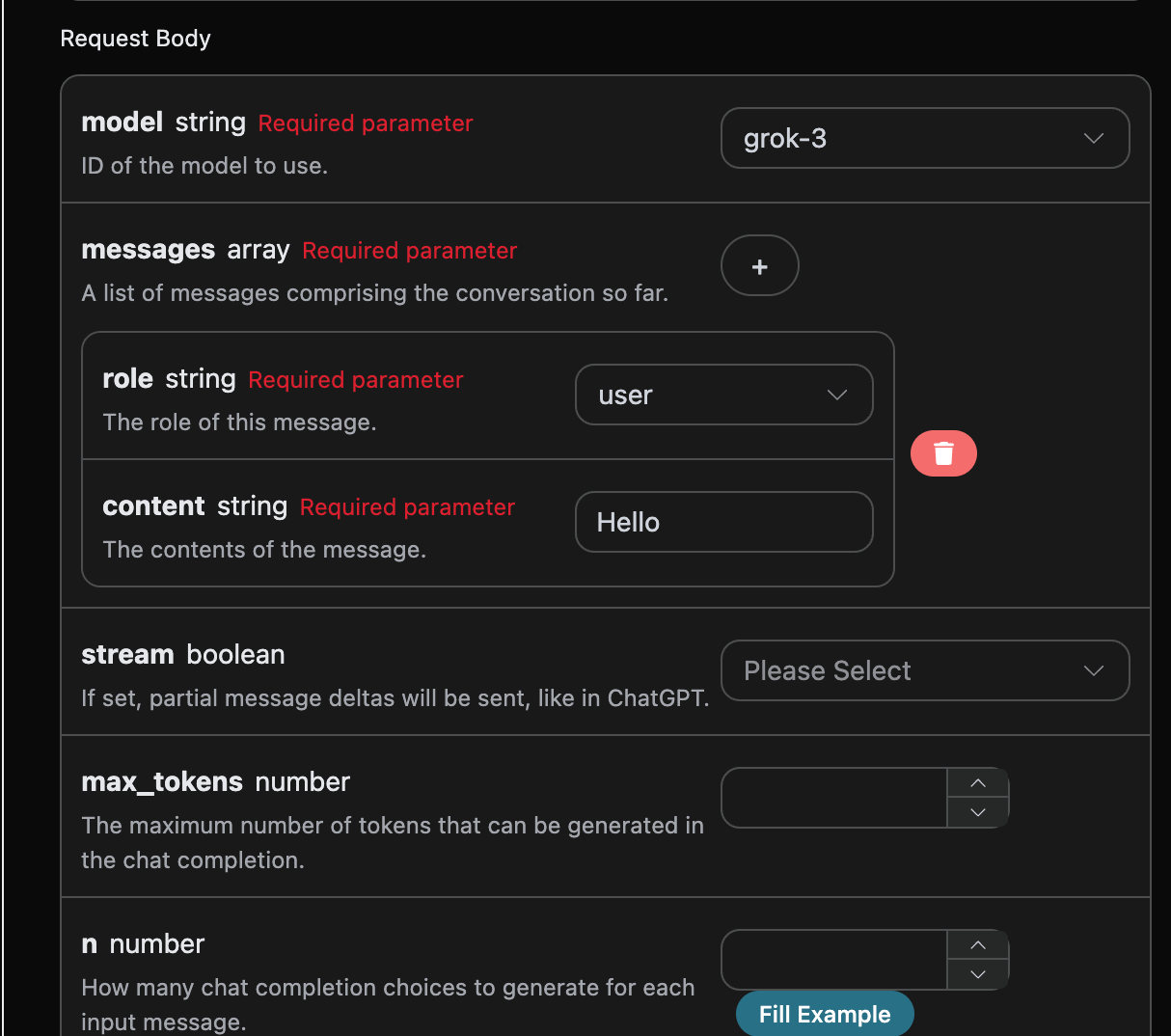
When using this interface for the first time, we need to fill in at least three pieces of content: one is authorization, which can be selected directly from the dropdown list. The other parameter is model, which is the category of the Grok official model we choose to use. Here we mainly have 8 types of models; details can be found in the models we provide. The last parameter is messages, which is an array of our input questions. It is an array that allows multiple questions to be uploaded simultaneously, with each question containing role and content. The role indicates the role of the questioner, and we provide three identities: user, assistant, and system. The other content is the specific content of our question.
You can also notice that there is corresponding code generation on the right side; you can copy the code to run directly or click the "Try" button for testing.
Common optional parameters:
max_tokens: Limits the maximum number of tokens for a single reply.temperature: Generates randomness, between 0-2, with larger values being more divergent.n: How many candidate replies to generate at once.
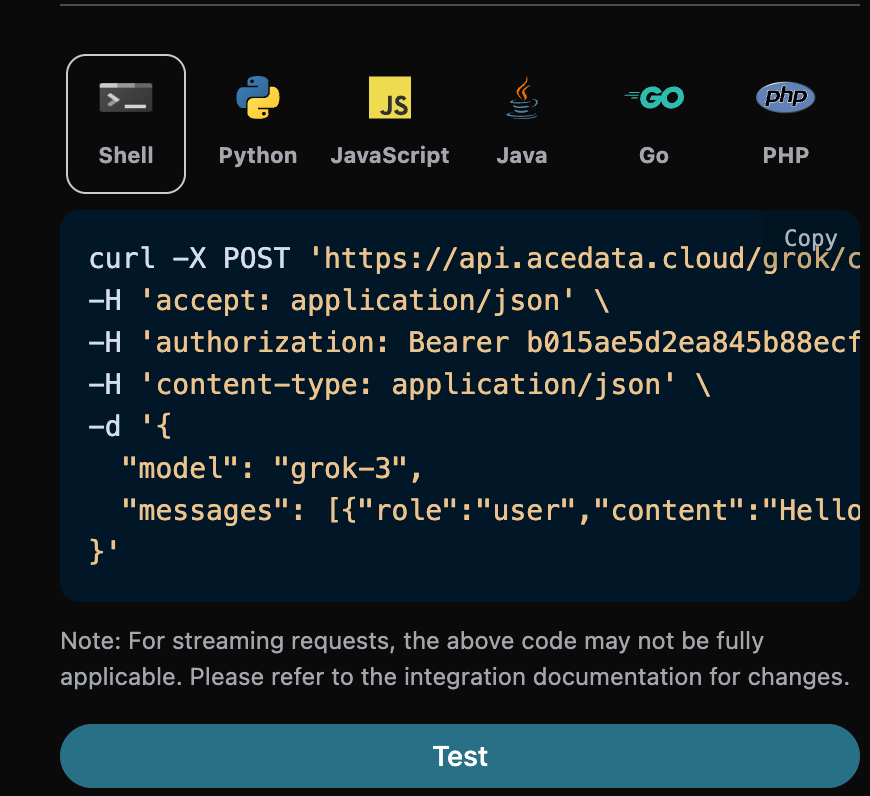
After the call, we find the return result as follows:
{
  "id": "foaicmpl-13936918-cb99-49e1-b94c-bde98b482ed4",
  "model": "grok-4",
  "object": "chat.completion",
  "created": 1755839683,
  "choices": [
    {
      "index": 0,
      "message": {
        "role": "assistant",
        "content": "Yo! What's up? 😎 Ready to dive into whatever you're pondering about today?"
      },
      "finish_reason": "stop"
    }
  ],
  "usage": {
    "prompt_tokens": 8,
    "completion_tokens": 20,
    "total_tokens": 28,
    "prompt_tokens_details": {
      "cached_tokens": 0,
      "text_tokens": 0,
      "audio_tokens": 0,
      "image_tokens": 0
    },
    "completion_tokens_details": {
      "text_tokens": 0,
      "audio_tokens": 0,
      "reasoning_tokens": 0
    },
    "input_tokens": 0,
    "output_tokens": 0,
    "input_tokens_details": null
  }
}
The return result contains multiple fields, described as follows:
id: The ID generated for this dialogue task, used to uniquely identify this dialogue task.model: The selected Grok official model.choices: The response information provided by Grok for the question.usage: Statistics on token usage for this Q&A.
Among them, choices contains the response information from Grok, and the choices inside it shows the specific information of Grok's response, as can be seen in the figure.
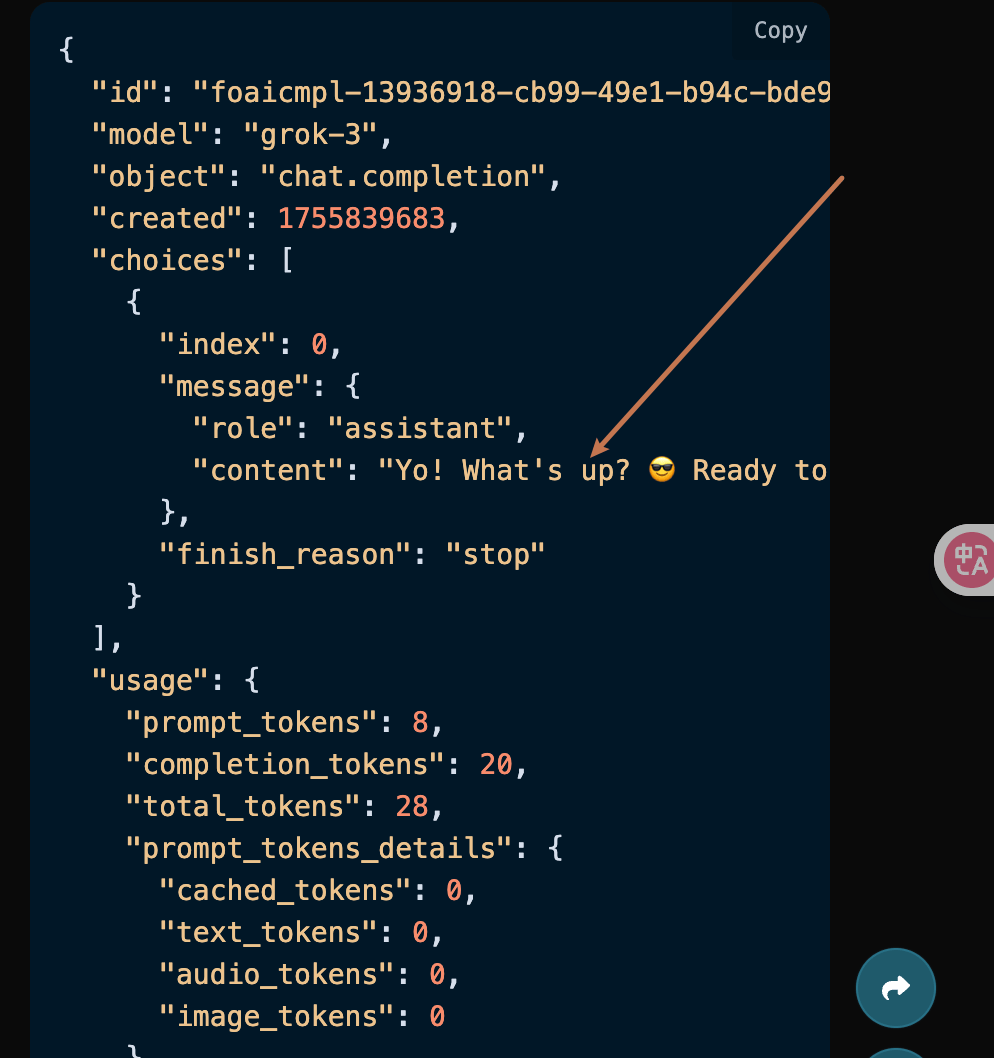
It can be seen that the content field in choices contains the specific content of Grok's reply.
¶ Streaming Response
This interface also supports streaming responses, which is very useful for web integration, allowing the webpage to achieve a character-by-character display effect.
If you want to return responses in a streaming manner, you can change the stream parameter in the request header to true.
Modify as shown in the figure, but the calling code needs to have corresponding changes to support streaming responses.
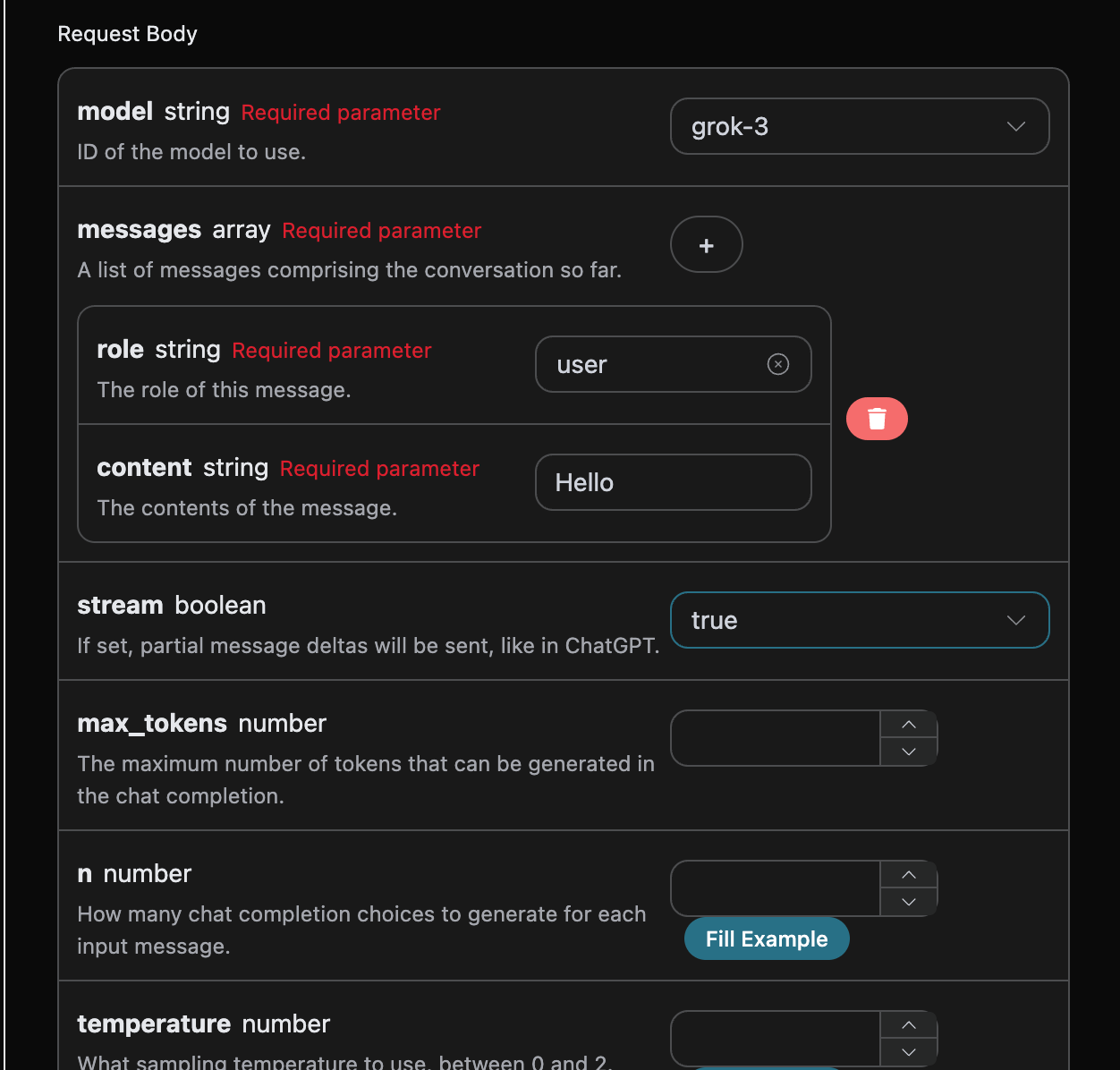
After changing stream to true, the API will return the corresponding JSON data line by line, and we need to make corresponding modifications at the code level to obtain the line-by-line results.
Python sample calling code:
import requests

url = "https://api.acedata.cloud/grok/chat/completions"

headers = {
    "accept": "application/json",
    "authorization": "Bearer {token}",
    "content-type": "application/json"
}

payload = {
    "model": "grok-3",
    "messages": [{"role":"user","content":"Hello"}],
    "stream": True
}

response = requests.post(url, json=payload, headers=headers)
print(response.text)
The output effect is as follows:
data: {"id": "foaicmpl-503ab14f-3f22-46ab-9f91-3fb44773be38", "object": "chat.completion.chunk", "created": 1755839790, "model": "grok-3", "system_fingerprint": null, "choices": [{"delta": {"role": "assistant"}, "logprobs": null, "finish_reason": null, "index": 0}], "usage": null}

data: {"id": "foaicmpl-503ab14f-3f22-46ab-9f91-3fb44773be38", "object": "chat.completion.chunk", "created": 1755839790, "model": "grok-3", "system_fingerprint": null, "choices": [{"delta": {"content": "Yo, "}, "logprobs": null, "finish_reason": null, "index": 0}], "usage": null}

data: {"id": "foaicmpl-503ab14f-3f22-46ab-9f91-3fb44773be38", "object": "chat.completion.chunk", "created": 1755839790, "model": "grok-3", "system_fingerprint": null, "choices": [{"delta": {"content": "what"}, "logprobs": null, "finish_reason": null, "index": 0}], "usage": null}

data:
{"id": "foaicmpl-503ab14f-3f22-46ab-9f91-3fb44773be38", "object": "chat.completion.chunk", "created": 1755839790, "model": "grok-3", "system_fingerprint": null, "choices": [{"delta": {"content": "'s g"}, "logprobs": null, "finish_reason": null, "index": 0}], "usage": null}

data: {"id": "foaicmpl-503ab14f-3f22-46ab-9f91-3fb44773be38", "object": "chat.completion.chunk", "created": 1755839790, "model": "grok-3", "system_fingerprint": null, "choices": [{"delta": {"content": "ood?"}, "logprobs": null, "finish_reason": null, "index": 0}], "usage": null}

data: {"id": "foaicmpl-503ab14f-3f22-46ab-9f91-3fb44773be38", "object": "chat.completion.chunk", "created": 1755839790, "model": "grok-3", "system_fingerprint": null, "choices": [{"delta": {"content": " Rea"}, "logprobs": null, "finish_reason": null, "index": 0}], "usage": null}

data: {"id": "foaicmpl-503ab14f-3f22-46ab-9f91-3fb44773be38", "object": "chat.completion.chunk", "created": 1755839790, "model": "grok-3", "system_fingerprint": null, "choices": [{"delta": {"content": "dy t"}, "logprobs": null, "finish_reason": null, "index": 0}], "usage": null}

data: {"id": "foaicmpl-503ab14f-3f22-46ab-9f91-3fb44773be38", "object": "chat.completion.chunk", "created": 1755839790, "model": "grok-3", "system_fingerprint": null, "choices": [{"delta": {"content": "o di"}, "logprobs": null, "finish_reason": null, "index": 0}], "usage": null}

data: {"id": "foaicmpl-503ab14f-3f22-46ab-9f91-3fb44773be38", "object": "chat.completion.chunk", "created": 1755839790, "model": "grok-3", "system_fingerprint": null, "choices": [{"delta": {"content": "ve i"}, "logprobs": null, "finish_reason": null, "index": 0}], "usage": null}

data: {"id": "foaicmpl-503ab14f-3f22-46ab-9f91-3fb44773be38", "object": "chat.completion.chunk", "created": 1755839790, "model": "grok-3", "system_fingerprint": null, "choices": [{"delta": {"content": "nto "}, "logprobs": null, "finish_reason": null, "index": 0}], "usage": null}

data: {"id": "foaicmpl-503ab14f-3f22-46ab-9f91-3fb44773be38", "object": "chat.completion.chunk", "created": 1755839790, "model": "grok-3", "system_fingerprint": null, "choices": [{"delta": {"content": "what"}, "logprobs": null, "finish_reason": null, "index": 0}], "usage": null}

data: {"id": "foaicmpl-503ab14f-3f22-46ab-9f91-3fb44773be38", "object": "chat.completion.chunk", "created": 1755839790, "model": "grok-3", "system_fingerprint": null, "choices": [{"delta": {"content": "ever"}, "logprobs": null, "finish_reason": null, "index": 0}], "usage": null}

data: {"id": "foaicmpl-503ab14f-3f22-46ab-9f91-3fb44773be38", "object": "chat.completion.chunk", "created": 1755839790, "model": "grok-3", "system_fingerprint": null, "choices": [{"delta": {"content": " you"}, "logprobs": null, "finish_reason": null, "index": 0}], "usage": null}

data: {"id": "foaicmpl-503ab14f-3f22-46ab-9f91-3fb44773be38", "object": "chat.completion.chunk", "created": 1755839790, "model": "grok-3", "system_fingerprint": null, "choices": [{"delta": {"content": "'re "}, "logprobs": null, "finish_reason": null, "index": 0}], "usage": null}

data: {"id": "foaicmpl-503ab14f-3f22-46ab-9f91-3fb44773be38", "object": "chat.completion.chunk", "created": 1755839790, "model": "grok-3", "system_fingerprint": null, "choices": [{"delta": {"content": "pond"}, "logprobs": null, "finish_reason": null, "index": 0}], "usage": null}

data: {"id": "foaicmpl-503ab14f-3f22-46ab-9f91-3fb44773be38", "object": "chat.completion.chunk", "created": 1755839790, "model": "grok-3", "system_fingerprint": null, "choices": [{"delta": {"content": "erin"}, "logprobs": null, "finish_reason": null, "index": 0}], "usage": null}

data: {"id": "foaicmpl-503ab14f-3f22-46ab-9f91-3fb44773be38", "object": "chat.completion.chunk", "created": 1755839790, "model": "grok-3", "system_fingerprint": null, "choices": [{"delta": {"content": "g ab"}, "logprobs": null, "finish_reason": null, "index": 0}], "usage": null}

data: {"id": "foaicmpl-503ab14f-3f22-46ab-9f91-3fb44773be38", "object": "chat.completion.chunk", "created": 1755839790, "model": "grok-3", "system_fingerprint": null, "choices": [{"delta": {"content": "out "}, "logprobs": null, "finish_reason": null, "index": 0}], "usage": null}

data: {"id": "foaicmpl-503ab14f-3f22-46ab-9f91-3fb44773be38", "object": "chat.completion.chunk", "created": 1755839790, "model": "grok-3", "system_fingerprint": null, "choices": [{"delta": {"content": "toda"}, "logprobs": null, "finish_reason": null, "index": 0}], "usage": null}

data: {"id": "foaicmpl-503ab14f-3f22-46ab-9f91-3fb44773be38", "object": "chat.completion.chunk", "created": 1755839790, "model": "grok-3", "system_fingerprint": null, "choices": [{"delta": {"content": "y?"}, "logprobs": null, "finish_reason": null, "index": 0}], "usage": null}

data: {"id": "foaicmpl-503ab14f-3f22-46ab-9f91-3fb44773be38", "object": "chat.completion.chunk", "created": 1755839790, "model": "grok-3", "system_fingerprint": null, "choices": [{"delta": {}, "logprobs": null, "finish_reason": "stop", "index": 0}], "usage": {"prompt_tokens": 0, "completion_tokens": 0, "total_tokens": 0, "prompt_tokens_details": {"cached_tokens": 0, "text_tokens": 0, "audio_tokens": 0, "image_tokens": 0}, "completion_tokens_details": {"text_tokens": 0, "audio_tokens": 0, "reasoning_tokens": 0}, "input_tokens": 0, "output_tokens": 0, "input_tokens_details": null}}

data:
{"id": "foaicmpl-503ab14f-3f22-46ab-9f91-3fb44773be38", "object": "chat.completion.chunk", "created": 1755839790, "model": "grok-3", "system_fingerprint": "", "choices": [], "usage": {"prompt_tokens": 8, "completion_tokens": 18, "total_tokens": 26, "prompt_tokens_details": {"cached_tokens": 0, "text_tokens": 0, "audio_tokens": 0, "image_tokens": 0}, "completion_tokens_details": {"text_tokens": 0, "audio_tokens": 0, "reasoning_tokens": 0}, "input_tokens": 0, "output_tokens": 0, "input_tokens_details": null}}

data: [DONE]
It can be seen that there are many data in the response, and the choices in data are the latest response content, consistent with the content introduced above. The choices are the newly added response content, which you can integrate into your system based on the results. At the same time, the end of the streaming response is determined by the content of data. If the content is [DONE], it indicates that the streaming response has completely ended. The returned data result has multiple fields, which are described as follows:
id, the ID generated for this dialogue task, used to uniquely identify this dialogue task.model, the selected Grok official model.choices, the response information provided by Grok for the question words.
JavaScript is also supported, for example, the streaming call code for Node.js is as follows:
const options = {
  method: "post",
  headers: {
    "accept": "application/json",
    "authorization": "Bearer {token}",
    "content-type": "application/json"
  },
  body: JSON.stringify({
    "model": "grok-3",
    "messages": [{"role":"user","content":"Hello"}],
    "stream": true
  })
};

fetch("https://api.acedata.cloud/grok/chat/completions", options)
  .then(response => response.json())
  .then(response => console.log(response))
  .catch(err => console.error(err));
Java sample code:
JSONObject jsonObject = new JSONObject();
jsonObject.put("model", "grok-3");
jsonObject.put("messages", [{"role":"user","content":"Hello"}]);
jsonObject.put("stream", true);
MediaType mediaType = "application/json; charset=utf-8".toMediaType();
RequestBody body = jsonObject.toString().toRequestBody(mediaType);
Request request = new Request.Builder()
  .url("https://api.acedata.cloud/grok/chat/completions")
  .post(body)
  .addHeader("accept", "application/json")
  .addHeader("authorization", "Bearer {token}")
  .addHeader("content-type", "application/json")
  .build();

OkHttpClient client = new OkHttpClient();
Response response = client.newCall(request).execute();
System.out.print(response.body!!.string())
Other languages can be rewritten accordingly, the principle is the same.
¶ Multi-turn Dialogue
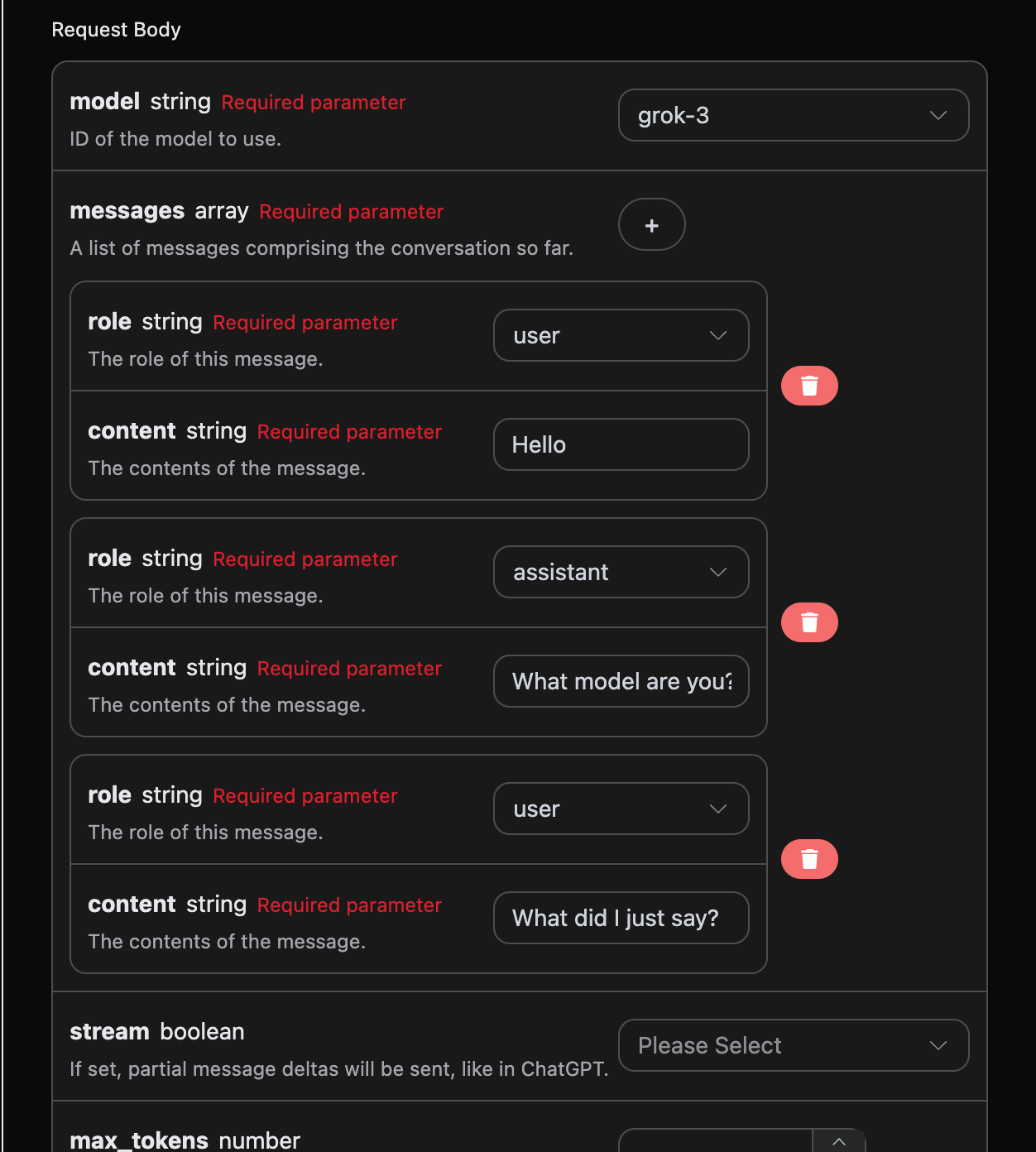
If you want to integrate multi-turn dialogue functionality, you need to upload multiple question words in the messages field. The specific example of multiple question words is shown in the image below:
Python sample call code:
import requests

url = "https://api.acedata.cloud/grok/chat/completions"

headers = {
    "accept": "application/json",
    "authorization": "Bearer {token}",
    "content-type": "application/json"
}

payload = {
    "model": "grok-3",
    "messages": [{"role":"user","content":"Hello"},{"role":"assistant","content":"What model are you?"},{"role":"user","content":"What did I just say?"}]
}

response = requests.post(url, json=payload, headers=headers)
print(response.text)
By uploading multiple question words, you can easily achieve multi-turn dialogue and obtain the following response:
{
  "id": "foaicmpl-984ebc53-76b3-4d33-b0e8-0307ab4965af",
  "model": "grok-3",
  "object": "chat.completion",
  "created": 1755839996,
  "choices": [
    {
      "index": 0,
      "message": {
        "role": "assistant",
        "content": "You said, \"Hello.\""
      },
      "finish_reason": "stop"
    }
  ],
  "usage": {
    "prompt_tokens": 27,
    "completion_tokens": 6,
    "total_tokens": 33,
    "prompt_tokens_details": {
      "cached_tokens": 0,
      "text_tokens": 0,
      "audio_tokens": 0,
      "image_tokens": 0
    },
    "completion_tokens_details": {
      "text_tokens": 0,
      "audio_tokens": 0,
      "reasoning_tokens": 0
    },
    "input_tokens": 0,
    "output_tokens": 0,
    "input_tokens_details": null
  }
}
It can be seen that the information contained in choices is consistent with the basic usage content, which includes the specific content of Grok's response to multiple dialogues, allowing you to answer corresponding questions based on multiple dialogue contents.
¶ Error Handling
When calling the API, if an error occurs, the API will return the corresponding error code and message. For example:
400 token_mismatched: Bad request, possibly due to missing or invalid parameters.400 api_not_implemented: Bad request, possibly due to missing or invalid parameters.401 invalid_token: Unauthorized, invalid or missing authorization token.429 too_many_requests: Too many requests, you have exceeded the rate limit.500 api_error: Internal server error, something went wrong on the server.
¶ Error Response Example
{
  "success": false,
  "error": {
    "code": "api_error",
    "message": "fetch failed"
  },
  "trace_id": "2cf86e86-22a4-46e1-ac2f-032c0f2a4e89"
}
¶ Conclusion
Through this document, you have learned how to easily implement the dialogue function of the official OpenAI ChatGPT using the OpenAI Chat Completion API. We hope this document can help you better integrate and use the API. If you have any questions, please feel free to contact our technical support team.