Using Ace Data Cloud in ChatBox
ChatBox is an open-source AI client that supports Windows, macOS, Linux, iOS, Android, and Web. It supports custom providers of the "OpenAI API" type, so it can directly integrate with Ace Data Cloud. This article introduces the configuration process.
¶ Application Process
To integrate Ace Data Cloud into ChatBox, first go to the Ace Data Cloud Console, obtain your API Token, and keep it for later use.

If you have not logged in or registered yet, you will be automatically redirected to the login page and invited to register and log in. After logging in or registering, you will automatically return to the current page.
A free quota is provided with the first application, allowing you to experience Ace Data Cloud's model services for free.
¶ Download ChatBox
Go to the ChatBox official website to download it by platform, or directly use the installation-free Web version:
- Desktop: Windows
.exe, macOS.dmg(Intel / Apple Silicon versions), Linux AppImage - Mobile: App Store, Google Play, official website Android direct link
¶ Configure Ace Data Cloud
Launch ChatBox, go to Settings → Models → Add Custom Provider, set API Mode to OpenAI API Compatible, then fill in:
| Field | Value | Description |
|---|---|---|
| API Key | Your Ace Data Cloud Token | The Token copied from the console |
| API Host | https://api.acedata.cloud |
Enter only the root domain, do not include /openai or /v1 |
| API Path | /v1/chat/completions |
ChatBox defaults to /chat/completions, so you need to manually change it to this |
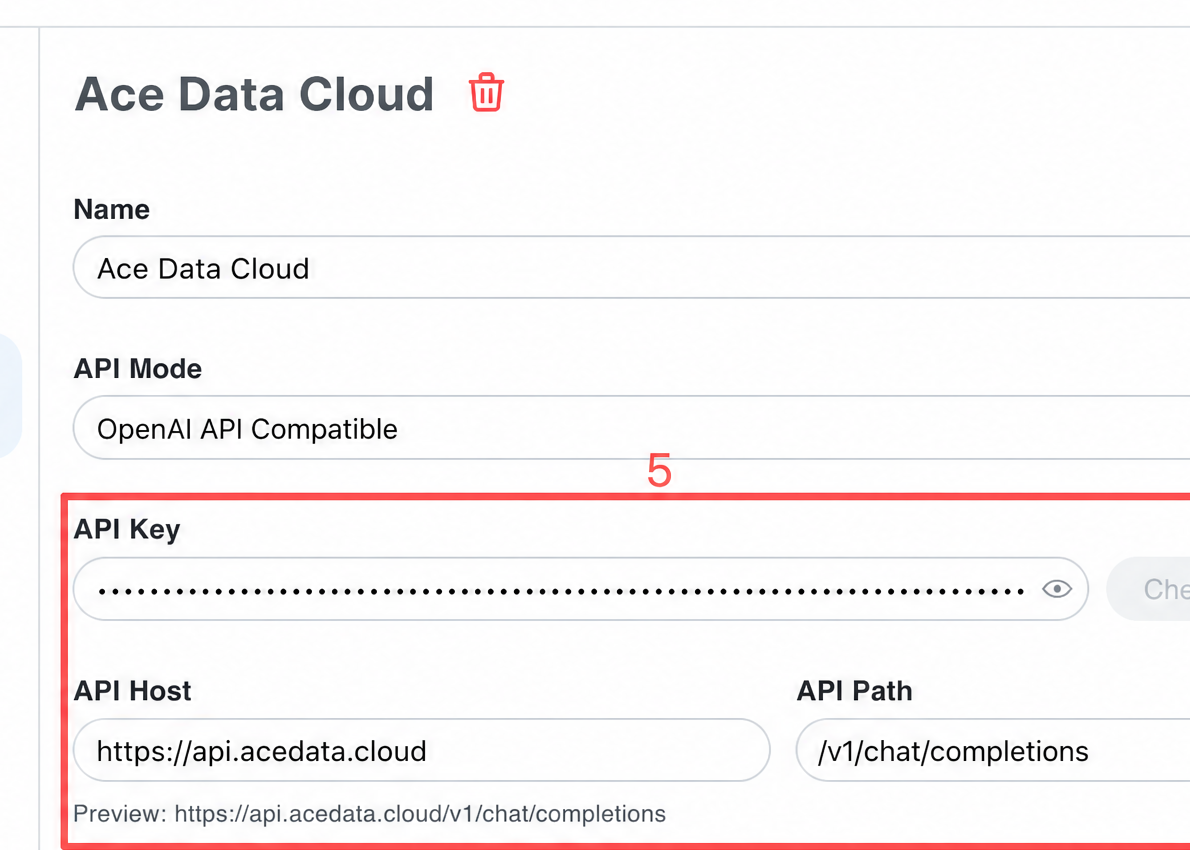
ChatBox's request path is {API Host} + {API Path}, so only enter the root domain in Host:
| API Host | Final Request | Result |
|---|---|---|
https://api.acedata.cloud |
https://api.acedata.cloud/v1/chat/completions |
Correct |
https://api.acedata.cloud/openai |
https://api.acedata.cloud/openai/v1/chat/completions |
404 (there is no /v1 under /openai) |
https://api.acedata.cloud/openai/v1 |
https://api.acedata.cloud/openai/v1/v1/chat/completions |
404 |
ChatBox does not automatically call /v1/models. You need to manually enter model IDs in the "Custom Models" input box at the bottom of the model settings page (one per line). After saving, you can select them from the model dropdown in the chat interface. Capability toggles, context window, and output limit must be filled in according to the current contract of the selected model; do not copy values from other models.
¶ Select a Model
The model catalog will continue to be updated. Prioritize using the model list automatically loaded by the client; when manual entry is required, first request GET https://api.acedata.cloud/v1/models to obtain the current model IDs, then select according to the context, image, and tool-calling capabilities supported by the client.
¶ Verify the Integration
If you are unsure whether the issue is with ChatBox or the network, you can first use curl to directly verify the endpoint (replace {token} with your Token):
curl -X POST 'https://api.acedata.cloud/v1/chat/completions' \
  -H 'Authorization: Bearer {token}' \
  -H 'Content-Type: application/json' \
  -d '{
    "model": "MODEL_ID",
    "messages": [{"role": "user", "content": "ping"}]
  }'
Receiving an OpenAI-compatible chat.completion object indicates that both the Token and endpoint are ready; if HTTP 403 used_up is returned, it means the Token is valid but the balance is insufficient. You can top up in the console.
¶ Frequently Asked Questions
¶ 404 Not Found Is Displayed
Usually, /openai or /v1 was unnecessarily added to API Host. Enter only https://api.acedata.cloud for Host, and leave the path as the default /v1/chat/completions.
¶ 401 / token_mismatched Is Displayed
Please confirm that the "API Key" contains the Ace Data Cloud Token (without the Bearer prefix and without extra spaces), and that the corresponding application's balance is sufficient.
¶ No Models Are Visible in the Model Dropdown
ChatBox does not automatically fetch the model list. You must manually enter the model IDs in the "Custom Models" box and save them.
¶ Want to Generate Images in ChatBox
Ace Data Cloud's image generation is a separate Images API (/openai/images/generations), using a different path from the chat API, and ChatBox's image entry cannot directly integrate with it. If you need to generate images, please refer to the Image Generation API Documentation and call it using curl / SDK.